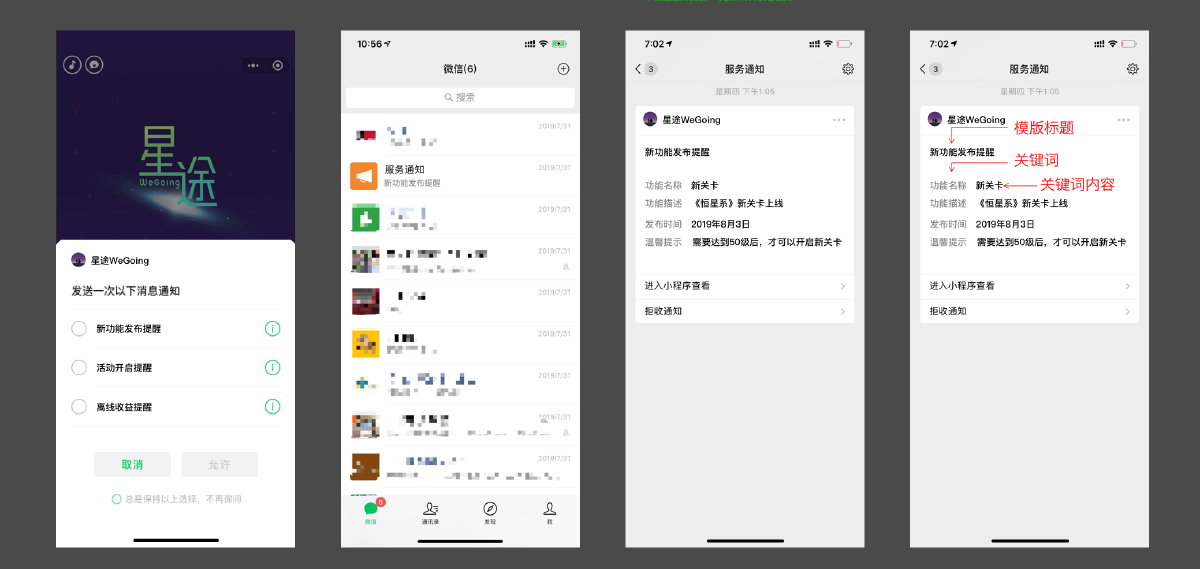
Introduction to the Subscribe Message Feature#
Official documentation: https://developers.weixin.qq.com/minigame/dev/guide/open-ability/subscribe-message.html
In WeChat Mini Games / WeChat Mini Programs, after a user subscribes to messages, actively pushed messages will be delivered to the user via the “Service Notifications” channel.
There are three types of subscribe messages: one-time subscribe messages, social interaction reminders, and game update reminders.
One-Time Subscribe Messages#
Client Side#
Subscribe to Messages#
Official documentation: https://developers.weixin.qq.com/minigame/dev/api/open-api/subscribe-message/wx.requestSubscribeMessage.html
// In mini games, this can only be used normally within the callbacks of the following APIs,
// i.e., in response to a user's tap action:
wx.onTouchEnd
wx.showModal
wx.showActionSheet
Note: For one-time subscribe messages, after subscribing once (i.e., calling wx.requestSubscribeMessage() once), the user can only receive one message (i.e., the cumulative number of receivable messages +1).
To push multiple messages, developers have the following two options:
Option 1: Guide players to check “Always keep the above choice, don’t ask again”, and silently trigger the subscription via the relevant button on each login.
Option 2: Explicitly add a button to increase the subscribe count. When the user taps the button, the subscribe count can be increased (refer to the WeChat Mini Program: Huyou).
Query Subscribe Message Status#
Official documentation: https://developers.weixin.qq.com/minigame/dev/api/open-api/setting/wx.getSetting.html
wx.getSetting()
// Pass withSubscriptions to also obtain the user's subscribe message status.
// Note: It only returns subscribe messages for which the user has checked
// "Always keep the above choice, don't ask again" in the subscription panel.
Server Side#
Send Subscribe Messages#
Official documentation: https://developers.weixin.qq.com/minigame/dev/api-backend/subscribe-message/api_sendmessage.html
Interface query parameter (required): access_token, the API call credential.
Request body parameters:
| Parameter | Type | Required | Description |
|---|---|---|---|
| template_id | string | Yes | The ID of the subscribe template to be sent |
| page | string | No | The page to navigate to after tapping the template card; limited to pages within this mini program. Supports parameters (e.g., index?foo=bar). If this field is empty, the template has no navigation |
| touser | string | Yes | The openid of the recipient (user) |
| data | object | Yes | Template content, in a format like { “phrase3”: { “value”: “Approved” }, “name1”: { “value”: “Subscribe” }, “date2”: { “value”: “2019-12-25 09:42” } } |
| miniprogram_state | string | No | Target mini program type: developer for development version; trial for trial version; formal for official version; defaults to official version |
| lang | string | No | The language type for “Enter Mini Program to view”; supports zh_CN (Simplified Chinese), en_US (English), zh_HK (Traditional Chinese), zh_TW (Traditional Chinese); defaults to zh_CN |
Error Codes#
| Error Code | Error Description | Solution |
|---|---|---|
| 40001 | invalid credential, access_token is invalid | The AppSecret was wrong when obtaining the access_token, or the access_token is invalid. Verify the AppSecret, or confirm whether the API is called with the correct account |
| 40003 | invalid openid | Illegal openid; confirm whether touser is an openid under this mini game |
| 40014 | invalid access_token | Illegal access_token; verify its validity (e.g., whether it has expired) |
| 40037 | invalid template_id | Illegal template_id |
| 43101 | User has not subscribed to messages | Check the subscription popup callback result or confirm whether the subscription succeeded; check whether the one-time subscribe count has been fully consumed |
| 43107 | Subscribe message capability banned | Check whether the account’s subscribe message capability is banned; check whether the template corresponding to the template id is banned |
| 43108 | Concurrently sending messages to the same user | Check whether multiple messages are being sent to the same user simultaneously |
| 45168 | Contains sensitive words | Check whether the sent message contains sensitive words |
| 47003 | Parameter error | Check whether the data structure format is correct; check whether each keyword meets the corresponding rules |
Recommended Solution#
Maintain User Subscribe Status#
- The server only maintains the subscribe count of each user for different template messages.
The server provides two APIs to the client:
Subscribe success report (subscribe count +1), reported when the client successfully subscribes to messages.
Refuse message report (reset subscribe count to zero), reported when the client queries the subscribe message status and finds the “subscribe message master switch is off” or the “subscribe status has changed to refuse”.
After turning off the subscribe message master switch in the WeChat Mini Game settings, or refusing a certain subscribe message template, the cumulative subscribe count for that template will be reset to zero.
Send Messages#
Validate the template parameter specifications.
Validate the subscribe count.
Deduct the subscribe count after a successful send.
WeChat APIs#
openid — Unique User Identifier (independent per mini game / mini program)#
How to obtain: After the client calls login() to obtain a code, pass it to the server which calls code2Session() to obtain it.
Official documentation: https://developers.weixin.qq.com/minigame/dev/api/open-api/login/wx.login.html
API Call Credential access_token#
Official documentation: https://developers.weixin.qq.com/doc/oplatform/developers/dev/AccessToken.html
There are two APIs to obtain the access_token API call credential; the stable version interface is recommended. Call the API with appid and secret to obtain the access_token. The access_token is valid for 2 hours and needs to be refreshed periodically. Repeatedly calling the stable version interface within the validity period will not update the access_token (no forced refresh). If a forced refresh is needed, you can include the force_refresh parameter; the minimum interval for a forced refresh is 30s.
Encapsulated SDK#
GitHub repository: https://github.com/muzimu/wechat-sdk
Basic usage:
import (
    "github.com/muzimu/wechat-sdk/cache"
    "github.com/muzimu/wechat-sdk/client"
    "github.com/muzimu/wechat-sdk/config"
    "github.com/muzimu/wechat-sdk/subscribe"
)

func main() {
    // Create configuration
    cfg := &config.Config{
        AppID:     "your_app_id",
        AppSecret: "your_app_secret",
        Cache:     cache.NewMemory(), // Use the built-in in-memory cache
    }

    // Create client
    cli := client.NewClient(cfg)
    sub := cli.GetSubscribe()

    // Send subscribe message
    msg := &subscribe.Message{
        ToUser:     "user_openid",
        TemplateID: "template_id",
        Page:       "pages/index/index",
        Data: map[string]*subscribe.DataItem{
            "thing1":  {Value: "Order content"},
            "amount2": {Value: "100.00"},
        },
    }

    err := sub.Send(msg)
    if err != nil {
        // Handle error
    }
}